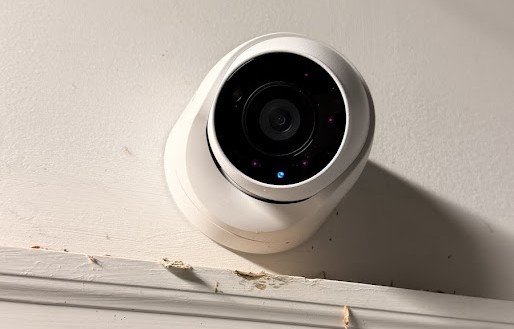
A diner is a room full of small arguments, and once in a while a big one. Two cars meet in the parking lot. A cop walks in asking whether a certain man was here last night. For most of my years running The Heritage Diner, the only witness to any of it was whoever happened to be standing closest. Now there are sixteen cameras, and the one I bought them around is Synology’s TC500.
As an Amazon Associate I earn from qualifying purchases. A commission may be earned if you buy through this link, at no extra cost to you.
What the TC500 Is
A 5-megapixel turret built to talk to one brand of recorder
Synology’s product page calls the TC500 an AI-powered turret camera with a 5 MP sensor, a 110-degree field of view, and IP67 and IK10 ratings, which in plain English means it shrugs off rain and a thrown object. Marius Hosting lists a top resolution of 2880 by 1620 at 30 frames per second, with H.264 and H.265 compression.
Dong Knows fills in the working details. The camera runs on basic 802.3af PoE, draws 4.8 watts, sees about 30 meters at night on infrared, and takes a microSD card up to 128 GB. A retailer listing confirms a built-in microphone.
Synology calls the shape a turret. NAS Compares calls its sibling dome style. Amazon’s own listing calls it a dome camera, and so do I, which tells you the argument isn’t worth having. It’s a rounded eye on a short neck, and it looks at what you point it at.

Why I Stayed Inside the Synology Fence
No license fee per camera, and a brand I already trusted
I’ve run Synology gear for years, at home and at work, so I knew the software before I bought the cameras. That mattered. But the real reason was arithmetic.
Synology’s Surveillance Station charges a license for every third-party camera. According to Black Void’s DVA3221 review, my recorder ships with eight licenses and supports up to 32 cameras. Synology’s own TC500 and BC500 don’t use those slots at all. Sixteen cameras, zero extra licenses. Hang sixteen cameras from some other brand on the same box and I’d be buying eight more licenses before the first frame recorded.
The recorder review covers the brain of the system. The switch review covers the box on my office shelf that feeds every camera its power.
Sixteen Eyes on Two Floors
The cameras were easy. The cable was not.
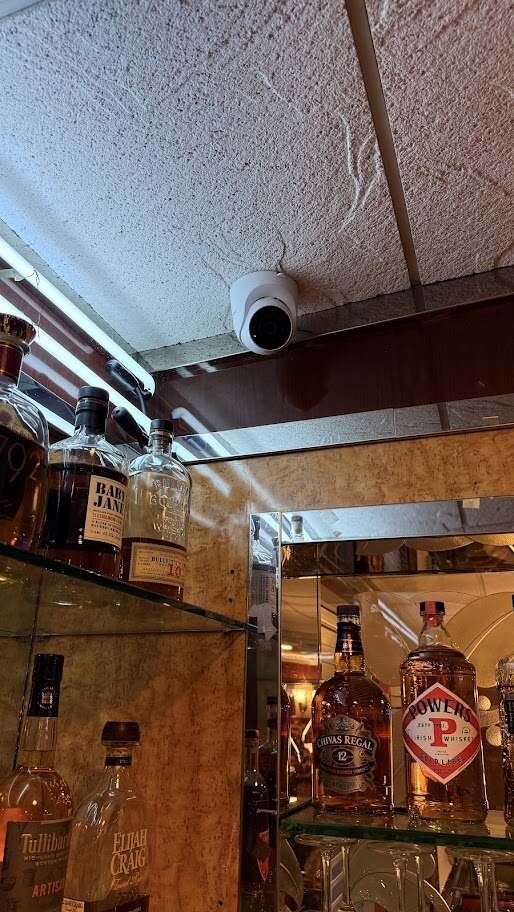
The TC500 is the camera in my January 2024 Amazon order, and it’s the name on the alerts my recorder sends: TC500-001, TC500-002, and on down the line. Sixteen of them now cover the diner inside and out, on two floors and around the perimeter.
Putting a camera on a wall takes minutes. Getting a cable to that wall took an IT guy and a lot of labor, sixteen runs in all. Every one of those lines ends at the TP-Link switch, and the switch hands the video to the recorder. One cable per camera carries both power and picture, which is the whole point of PoE.
NAS Compares’ TC500 review notes a base that turns a full 360 degrees and tilts through about 100. That’s what makes aiming one a two-minute job instead of a puzzle. Black Void’s review points out that the SD card slot and reset button hide behind two screws on the body, so plan on a screwdriver and a ladder if you ever need either.

The Picture, and the Live View Trick
High res for the record, low res for watching
On high resolution the picture is good. Faces, plates, the color of a jacket, the time on the wall clock. That’s what the recorder keeps, all sixteen cameras recording at full resolution, because the recording is the thing that matters when somebody needs proof.
Watching all sixteen live is a different job. When I open the grid to see the whole diner at once, I run it on the low-resolution stream. The recorder can’t push sixteen high-res feeds to one screen without everything bogging down, and a slow live view is worse than a soft one. Low res on the grid, high res on the recording. If something catches my eye, I open that one camera full size.
I also cut the audio on the low-res stream. Dropping the sound helps the picture on the live view, on the desktop and especially on my phone, where the connection is thinner and every bit of data counts. Honestly, picture quality was the main reason I turned the audio off. The legal side, covered below, is a bonus.
What the Footage Has Done
Accidents, police calls, and one sleeping driver
The cameras have paid for themselves in moments I couldn’t have planned. They’ve settled car accidents in the lot, where two drivers had two stories and the video had one. They’ve answered police questions more than once. One night a drunk driver was found asleep in his car, and the police wanted proof he’d been inside the diner. The footage showed them.
That’s the job. Not watching employees, not catching somebody with a hand in the register. Being the witness when the people standing closest disagree, or when the people asking wear a badge.
When a Camera Drops Off
My real complaint, and what I’d do about it
Here’s the part no spec sheet tells you. Cameras have dropped off my system more than once, and I still don’t know why. When one goes, I have to sign it back into the recorder by hand. On a quiet Tuesday afternoon, that’s five minutes and a shrug. When it happens during a Sunday rush or overnight, it’s a hole in the footage at exactly the hours I bought the cameras to cover.
I’m not alone in seeing cameras fall off Surveillance Station. Owners on IPCamTalk and the Synology forum community describe cameras going “disconnected” and needing to be deleted and added again, though most of those threads involve other brands. One owner on IPCamTalk described a camera that dropped and reconnected at random, mostly at night.
What I’d tell anyone setting up the same system:
- Put a card in every camera. Mine don’t have them yet, and they should. Dong Knows says footage on the microSD card acts as edge recording, a backup Surveillance Station can pull after the connection to the recorder comes back. A camera that drops off the network can keep recording to itself, which would have covered every gap I’ve had.
- Get told when a camera goes dark. Right now I only find out a camera dropped when I look. That’s backwards. A camera losing its connection at 2 a.m. deserves an alert, so I find out before I need the footage, not after.
- Check the boring stuff first. The switch, the cable to that camera, firmware on the camera, firmware on the recorder. In my experience with any equipment, the dramatic theory is rarely the answer. It’s usually a connector.
The Microphone and the Law
Audio is a feature. In New York it’s also a liability.
When I first set the system up in January 2024, my recorder sent a run of emails reporting that Surveillance Station had detected sound on TC500-001 and TC500-002. Dong Knows lists audio detection among the camera’s analytics and praises how clear the microphone is. In a kitchen, a clear microphone picks up a lot. I turned the audio down for picture quality, but anyone who leaves it on should read the next two paragraphs twice.
New York’s Labor Law section 203-c bars an employer from video recording employees in a restroom, locker room or room set aside for changing, without a court order. Penal Law section 250.05 makes eavesdropping, recording a conversation without legal authorization, a class E felony. Before anyone records or alerts on sound, they should run the audio setting past a New York attorney. Camera placement and signage deserve the same review.
This is not legal advice. It’s the reason the microphone setting deserves more thought than the camera angle.

What Other Reviewers Say
Great picture, tight integration, a price that stings
Dong Knows scored the TC500 8 out of 10: 9 for performance and features, 7.5 for design and ease of use, 6.5 for value. The cons it lists are the price, no PoE injector or power adapter in the box, no Wi-Fi or pan-tilt-zoom, and the fact that it only works with Synology recorders. It puts the U.S. list price at $219.
That last con is the honest turn in my own story. The same fence that saved me sixteen license fees is the fence I can’t climb out of. These cameras work with a Synology recorder or they’re paperweights. If I ever leave Synology, I’m not changing a recorder. I’m changing sixteen cameras and climbing sixteen ladders. I knew that going in, and I’d still make the trade, but anyone who isn’t sure about the brand should think about it before the first ladder goes up.
Who Should Buy It
If you already run a Synology recorder, or plan to, the TC500 is the easy call. The license savings alone pay for a good share of the cameras, and everything shows up in one interface without fighting compatibility. If you want freedom to mix brands, or you have no PoE switch and don’t want one, look elsewhere. No injector ships in the box.
- Synology TC500 IP Camera: the 5 MP PoE turret running in my diner, no Surveillance Station license needed. See it on Amazon (affiliate link)
I run The Heritage Diner, where these cameras are installed. The Amazon link above is an affiliate link.
For informational purposes only — consult a licensed attorney or financial advisor.
Sources
- Synology TC500 product page: https://synology.com/products/TC500
- Marius Hosting, TC500 specs: https://mariushosting.com/?p=49399
- Dong Knows, TC500 review: https://dongknows.com/synology-tc500-ip-camera-review/
- NAS Compares, TC500 review: https://nascompares.com/review/synology-tc500-camera-review-best-camera-for-surveillance-station/
- NAS Compares, BC500 review: https://nascompares.com/2023/07/17/synology-bc500-camera-review-looks-smart/synology-surveillance-station-9-emap-view/
- Black Void, BC500 and TC500 review: https://www.blackvoid.club/synology-bc500-tc500-cameras-review/
- Black Void, DVA3221 review: https://www.blackvoid.club/synology-dva3221-surveillance-station-9-review-part-1/
- channelonline TC500 listing: https://usm.channelonline.com/valiant/storesite/Products/overview/M024395392
- IPCamTalk disconnect threads: https://ipcamtalk.com/threads/camera-disconnected-message-on-synology-ss-fix.48692/ and https://ipcamtalk.com/goto/post?id=327077
- SynoForum thread: https://www.synoforum.com/threads/synology-surveillance-station-and-reolink-511w-cameras.5759/
- NY Labor Law 203-c: https://www.nysenate.gov/legislation/laws/LAB/203-C
- NY Penal Law 250.05: https://www.nysenate.gov/legislation/laws/PEN/250.05
- Synology video: https://www.youtube.com/watch?v=ejjYusi0A5g