
A one-page website is a counter with a sign over it. The customer arrives with one or two questions, finds the answers without opening a drawer, and either calls, walks in or leaves. For a small business that has no site at all, this is a reasonable first build, and I have built one myself. I will not pretend to give you my click-by-click settings, because the tools change faster than the principles do. What follows is the part that holds up: what belongs on the page, how Google reads it, and where the single page runs out.
Start with what a customer came to find out

Most visitors to a small business site want one of five things: what you do, where you are, when you are open, how to reach you and whether you look real. Everything else on the page is an extra, and the extras tend to crowd out the five.
Write those five down before you open a website builder. Then put them on the page in the order a person would ask them. A name and a plain sentence on what the business does comes first. Hours, address and phone number come next, as text and not as a picture of text, so a phone can dial the number with one touch and a search engine can read it. Last comes a single thing you want the visitor to do: call, order, book or visit.
The Heritage Diner’s own website carries images, videos, daily specials, phone numbers, links and menu items. That is a lot of parts for a restaurant that serves people at a counter, and it works because each piece answers a question a hungry person has. A one-page site for a smaller business needs fewer parts, not different ones.
One page, several sections
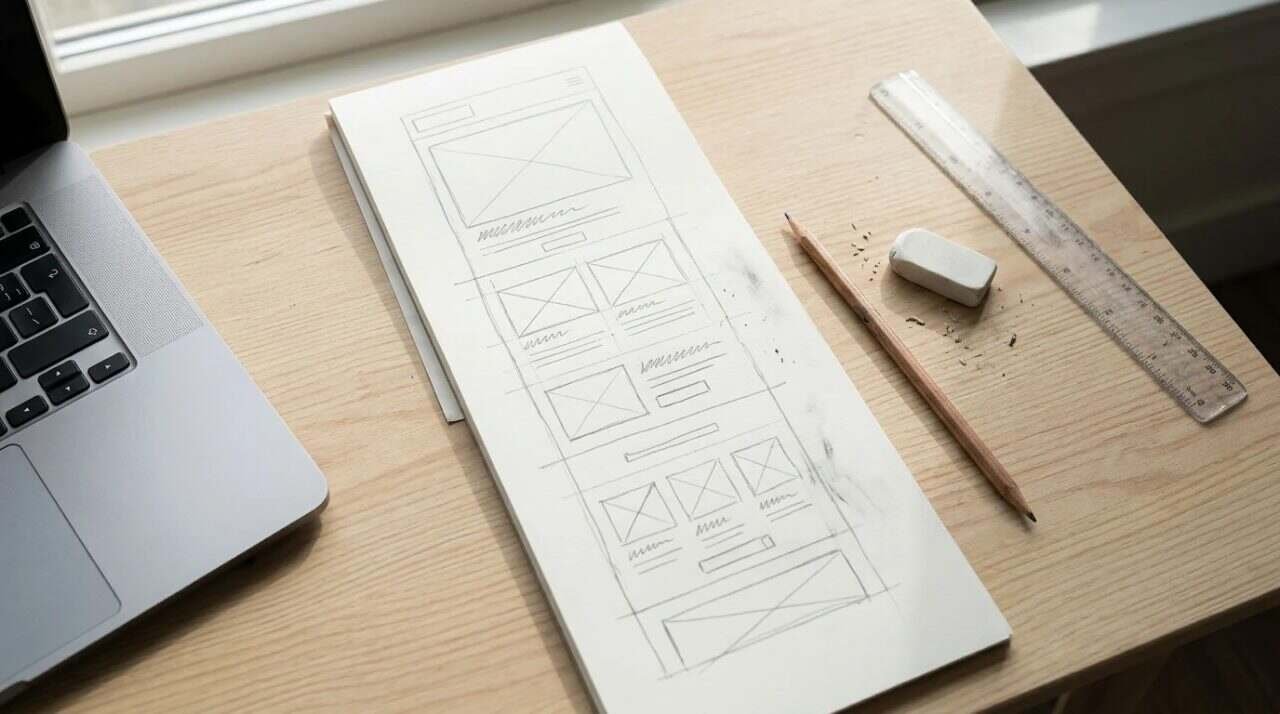
A one-page site is still divided. Think of it as a scroll with stops: a top section with the name and the main action, a short section on what you offer, a section with a few photographs, and a section with contact details and hours. A visitor who wants the phone number should reach it with a thumb flick and not a hunt.
Keep the language flat and specific. “Handmade briefcases in English bridle leather” tells a reader something. “Quality craftsmanship for the discerning customer” tells a reader nothing and could be pasted onto any business in the county. I make leather briefcases through Marcellino NY, which has been my own business since 2010, and I mention it here as a disclosure, since it is the sort of business that would use a page like this. The specific words are the ones that carry.
The title and description are written once and read many times
When a stranger searches for you, what they see first is a title and a short description. You write both, and Google decides how to use them.
Google’s own SEO starter guide says each page should have a unique, clear and concise title that accurately describes the page. It adds that the title can include your business name and useful details, such as your location, where it fits. For a one-page site there is only one page, so there is only one title to get right, and it should name the business and say what it is.
The same guide says a meta description should be a short one or two sentences, unique to the page, covering its most relevant points. Google may use it as the snippet shown under the title, but it may also pull text from the page instead. So the description is worth writing, and the page text underneath it is worth writing just as carefully, since the page text can end up as the snippet.
The guide also says what not to bother with. The keywords meta tag is not used by Google Search, and word count and heading order are not direct ranking factors. It warns against keyword stuffing, which it calls tiring for users and against spam policies. For a small business, this removes a good deal of nervous fiddling. You do not need to cram the town name into every sentence.
Headings are still worth using. The guide says headings help readers move through sections, and that heading order, while it does not matter to Google Search, helps screen readers. On a one-page site the headings are your sections, so they do real work for the person scrolling.
Build it for the phone first

Someone looking for a restaurant or a shop is often standing somewhere with a phone and one free hand. A page that only works on a desktop screen fails that person, who is the one closest to acting.
Google says it uses the mobile version of a site for indexing and ranking, which it calls mobile-first indexing. It recommends responsive design, where one page rearranges itself to fit the screen, as the easiest approach to build and maintain. For a single page, that is the obvious choice, because there is no second version to keep in step.
Google lists what to keep the same on mobile and desktop: the primary content, the headings, the image alt text, and the titles and descriptions. It also says hiding content in accordions or tabs is acceptable. That helps on a one-page site, because a long list of menu items or services can be folded away without being lost.
I would test this the dull way. Open the page on a phone, on a bad connection, outside, and try to do the one thing you built it for. Press the phone number. Read the hours without zooming. If you cannot, the visitor will not either.
Fewer moving parts
A video that autoplays, a slideshow that slides and a pop-up that asks for an email address are three ways to make a one-page site worse. Each one is a good idea on its own and a hindrance on a page that exists to answer five questions. If you have a video, such as a short walk-through of the shop, place it where a visitor can find it and press play on their own terms.
Pictures, with words attached
Photographs do more than decorate a one-page site. They are the proof that the business exists. A picture of the counter, the bench, the dish or the product tells a stranger more than another sentence would.
Each image needs alt text, and Google’s guide says to keep it short but descriptive, explaining what the image shows and how it relates to the page. It also says to put images near the text they relate to, and to use sharp, clear ones. Alt text serves a second purpose: it is what a screen reader says out loud to a visitor who cannot see the photograph. I wrote more on this in a post about alt text and image file names.
Name the image files for what they show before you upload them. A file named with a string of camera numbers tells nobody anything, while one named for the thing in the picture is at least a start.
Keep the page and the Google listing telling the same story
A one-page site is rarely the first thing a customer sees. For a local business, the first thing is often the Google listing, with the hours, the phone number and a link to your site.
Google says on its Business Profile help page that businesses with complete and accurate information are more likely to appear in local search results, and that inaccurate information may keep a profile from showing for relevant searches. It tells owners to keep regular hours current, to add special hours, and to keep the address, category and attributes up to date.
I know the cost of letting this slide. The Heritage Diner’s Google Business Profile once showed stale menu prices, because menus were updated by hand and I forgot one. People called to order from the old menu. Today the diner keeps one menu and syncs it to Google, the website and other places, which means a price changed in one spot changes everywhere. The lesson for a one-page site is the same: put each fact in one place if you can, and make everything else point at it.
If the page lists hours, the Google listing should list the same hours. If the page says a number, the listing should say that number. A mismatch between the two is how a customer ends up standing at a locked door. For the domain and email that go with the page, I covered the basics in a post on domain names and business email.
Where one page stops being enough
There is an honest limit here, and it is worth stating before you spend a weekend on it. A single page can carry about as much as a person will scroll. A business with dozens of products, many separate services, or content that changes every week will outgrow it.
Several signs say it is time for more pages. You are cutting useful information to keep the page short. Customers keep asking questions the page could answer if it had room. Or you want visitors to find a particular product through a search, and the one page cannot be about everything at once.
Google’s guide offers one more reminder that suits a small site. It suggests setting up Search Console to monitor how your site performs in search, and waiting a few weeks after making changes before judging the effect. That patience applies to a one-page site more than any other, since there is so little to change. Build it, check it on a phone, match it to your listing, and leave it alone long enough to see what it does.
For informational purposes only. Search engine behavior and platform tools change, so check current documentation before relying on any setting, and consult a licensed attorney about any legal notices your site needs.
Sources
- Google Search Central, SEO Starter Guide: https://developers.google.com/search/docs/fundamentals/seo-starter-guide
- Google Search Central, Mobile sites and mobile-first indexing: https://developers.google.com/search/docs/crawling-indexing/mobile/mobile-sites-mobile-first-indexing
- Google Business Profile Help, Edit your Business Profile information: https://support.google.com/business/answer/7091
- Video: https://www.youtube.com/watch?v=20Bp0ucsiGQ